
Work
About
Snipbit
Code Snippet Library
View Prototype
Timeline
12 Weeks
(Sept - Nov 2024)
My Role
UX/UI Designer
The Team
Myself
Tools
Figma
Introduction
Skincare has become an esssential part of modern self-care. These days it’s sooner with the rise of social media and influencers promoting self-care and the importance of skin health.
The Problem
Developers often store code snippets across notes apps, text files, or scattered documents, making it difficult to quickly retrieve and reuse them. Existing solutions can feel cluttered or overly complex, slowing down workflows instead of supporting them.
The Solution
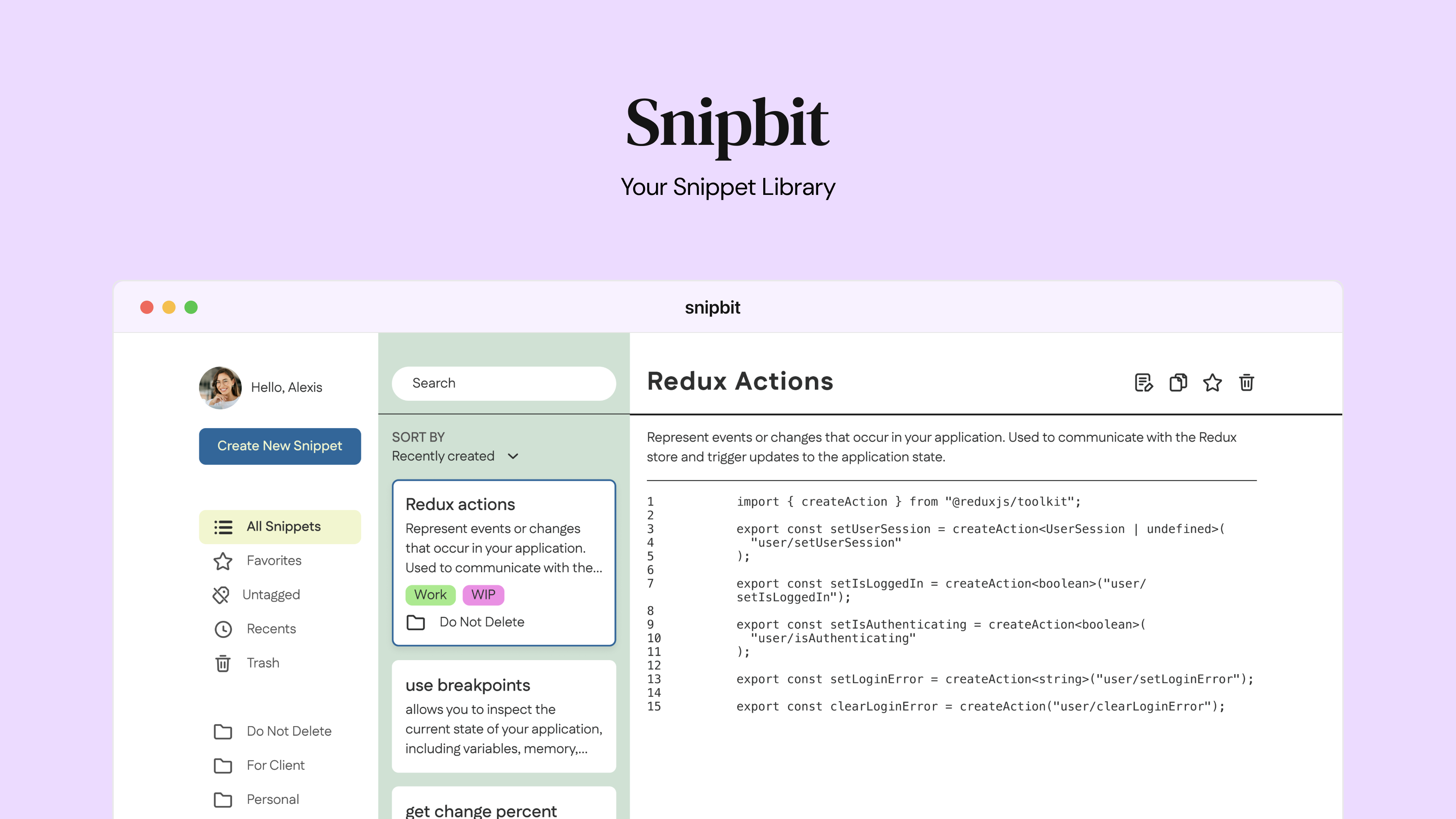
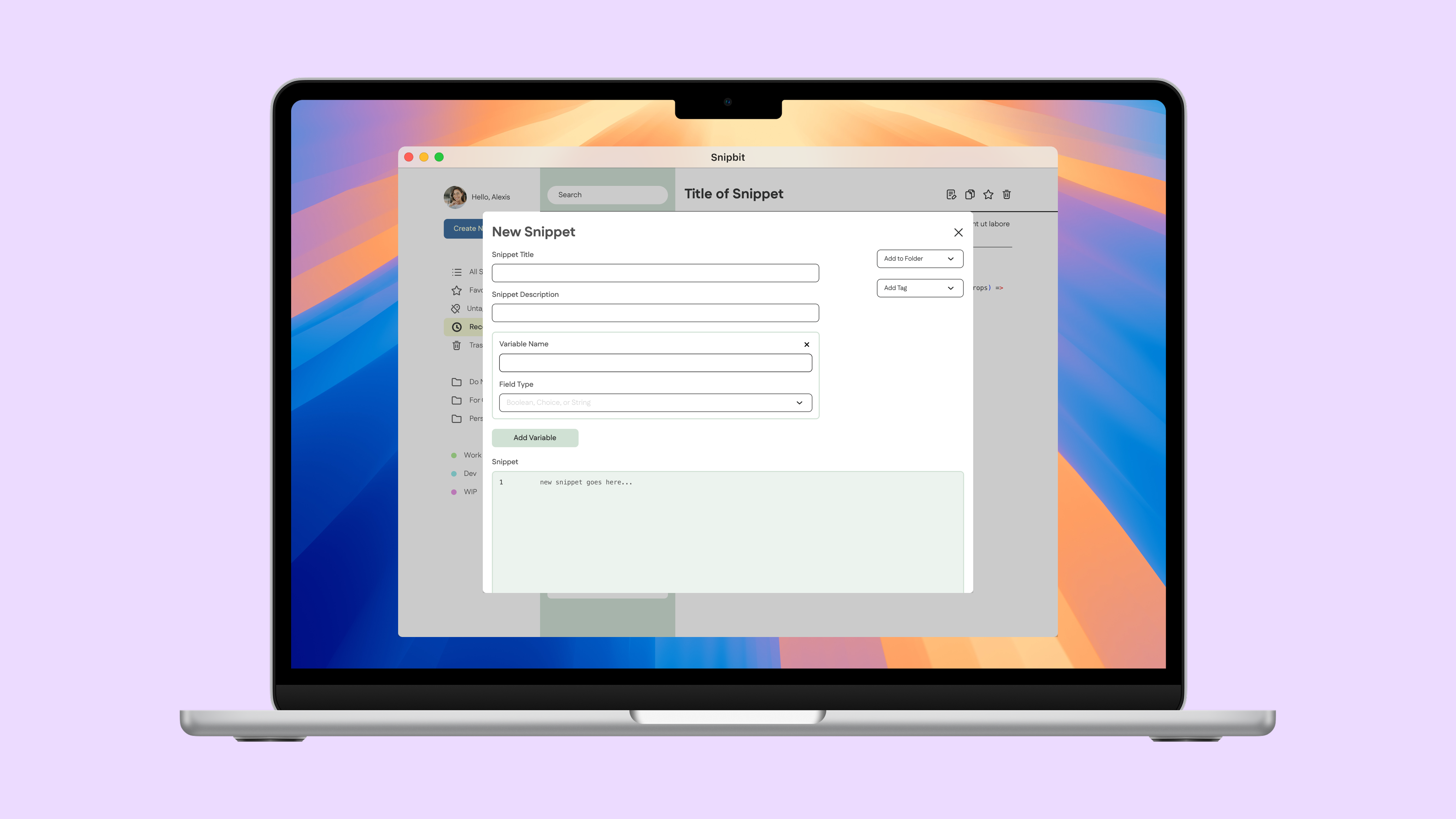
The application provides a streamlined desktop interface for storing, editing, and categorizing code snippets. By focusing on clarity, speed, and organization, the tool supports developers in quickly retrieving reusable code without disrupting their workflow.
Design Process
Ideate
Site Map
Wireframes
Prototype & Test
Visual Design
Initial Prototype
Site Map
Skincare has become an esssential part of modern self-care. These days it’s sooner with the rise of social media and influencers promoting self-care and the importance of skin health.
Wireframes
Skincare has become an esssential part of modern self-care. These days it’s sooner with the rise of social media and influencers promoting self-care and the importance of skin health.
View Full Exploration
View Interactive Prototype
Visual Design
Skincare has become an esssential part of modern self-care. These days it’s sooner with the rise of social media and influencers promoting self-care and the importance of skin health.
Visual Style
Skincare has become an esssential part of modern self-care. These days it’s sooner with the rise of social media and influencers promoting self-care and the importance of skin health.
Reflections & Learnings
Minimalism & Functionality
Skincare has become an esssential part of modern self-care. These days it’s sooner with the rise of social media and influencers promoting self-care and the importance of skin health.
Next Steps
Feature Expansion and Refinement
Skincare has become an esssential part of modern self-care. These days it’s sooner with the rise of social media and influencers promoting self-care and the importance of skin health.


click here to know more about me

Resume
Work
About
Snipbit
Code Snippet Library
View Prototype
Timeline
12 Weeks
(Sept - Nov 2024)
My Role
UX/UI Designer
The Team
Myself
Tools
Figma
The Problem
Developers often store code snippets across notes apps, text files, or scattered documents, making it difficult to quickly retrieve and reuse them. Existing solutions can feel cluttered or overly complex, slowing down workflows instead of supporting them.
Introduction
Skincare has become an esssential part of modern self-care. These days it’s sooner with the rise of social media and influencers promoting self-care and the importance of skin health.
The Solution
The application provides a streamlined desktop interface for storing, editing, and categorizing code snippets. By focusing on clarity, speed, and organization, the tool supports developers in quickly retrieving reusable code without disrupting their workflow.
Design Process
Ideate
Site Map
Wireframes
Prototype & Test
Visual Design
Initial Prototype
Site Map
Skincare has become an esssential part of modern self-care. These days it’s sooner with the rise of social media and influencers promoting self-care and the importance of skin health.
Wireframes
Skincare has become an esssential part of modern self-care. These days it’s sooner with the rise of social media and influencers promoting self-care and the importance of skin health.
View Full Exploration
View Interactive Prototype
Visual Design
Skincare has become an esssential part of modern self-care. These days it’s sooner with the rise of social media and influencers promoting self-care and the importance of skin health.
Visual Style
Skincare has become an esssential part of modern self-care. These days it’s sooner with the rise of social media and influencers promoting self-care and the importance of skin health.
Reflections & Learnings
Skincare has become an esssential part of modern self-care. These days it’s sooner with the rise of social media and influencers promoting self-care and the importance of skin health.
Minimalism & Functionality
Next Steps
Skincare has become an esssential part of modern self-care. These days it’s sooner with the rise of social media and influencers promoting self-care and the importance of skin health.
Feature Expansion and Refinement


click here to know more about me
Resume
Work
About
Snipbit
Code Snippet Library
View Prototype
Timeline
12 Weeks
(Sept - Nov 2024)
My Role
UX/UI Designer
The Team
Myself
Tools
Figma
Introduction
Snipbit is a desktop application designed to help developers efficiently save, organize, and reuse code snippets. The tool enables users to quickly store useful code, add contextual notes, and categorize snippets for easy retrieval, reducing repetitive searching and improving workflow efficiency.
The Problem
Developers often store code snippets across notes apps, text files, or scattered documents, making it difficult to quickly retrieve and reuse them. Existing solutions can feel cluttered or overly complex, slowing down workflows instead of supporting them.
The Solution
The application provides a streamlined desktop interface for storing, editing, and categorizing code snippets. By focusing on clarity, speed, and organization, the tool supports developers in quickly retrieving reusable code without disrupting their workflow.
Design Process
Ideate
Site Map
Wireframes
Prototype & Test
Visual Design
Initial Prototype
Site Map
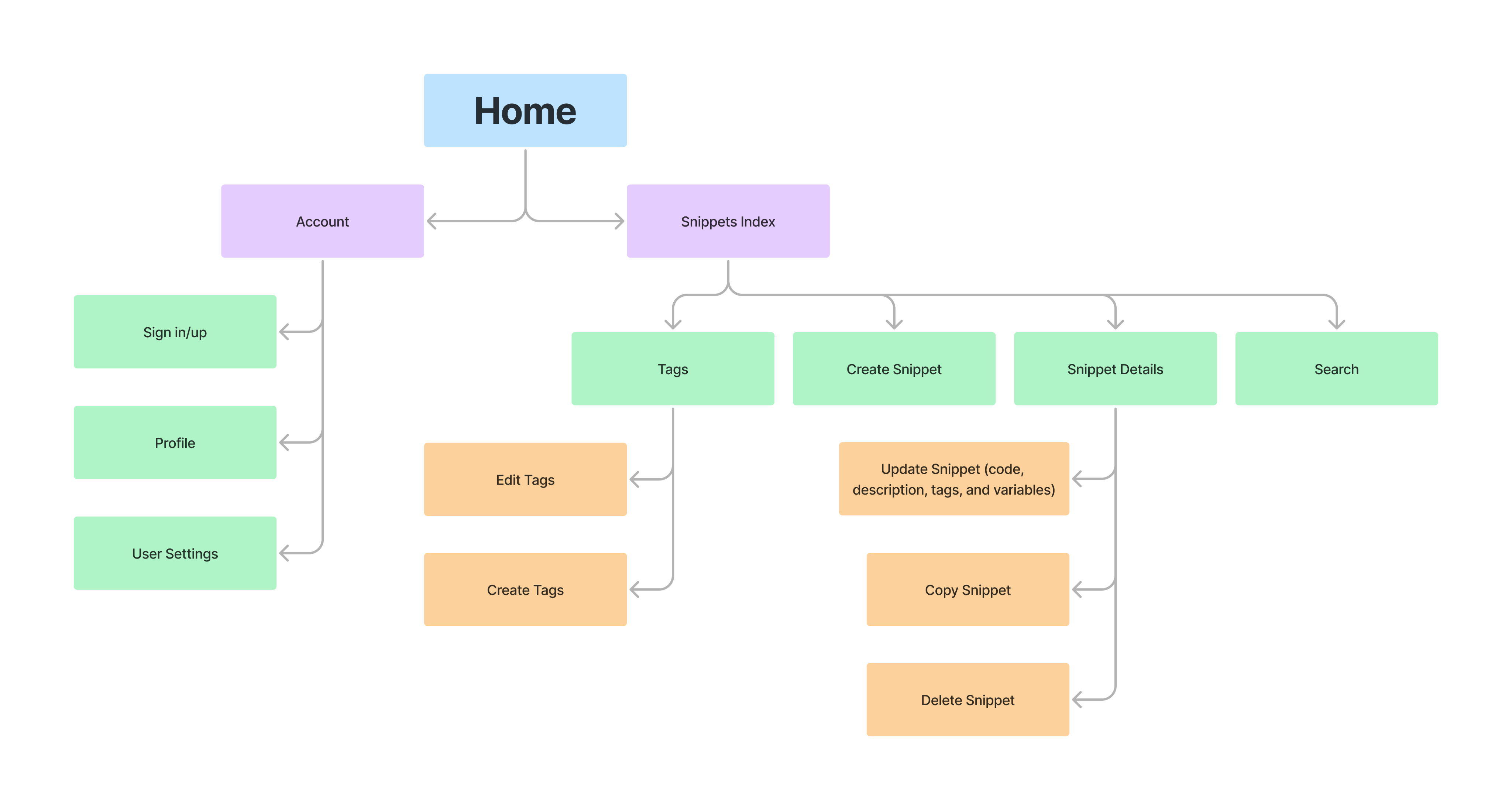
The site map establishes a clear hierarchy between account settings and snippet management. Core actions such as creating, editing, tagging, searching, and copying snippets are centralized within the main workspace to support quick retrieval and streamlined interaction.
Wireframes
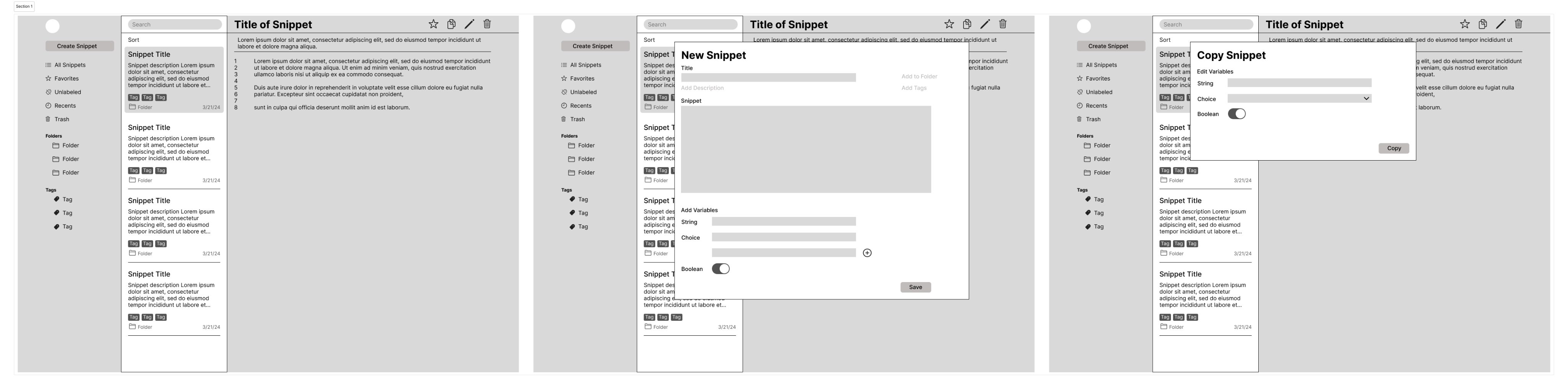
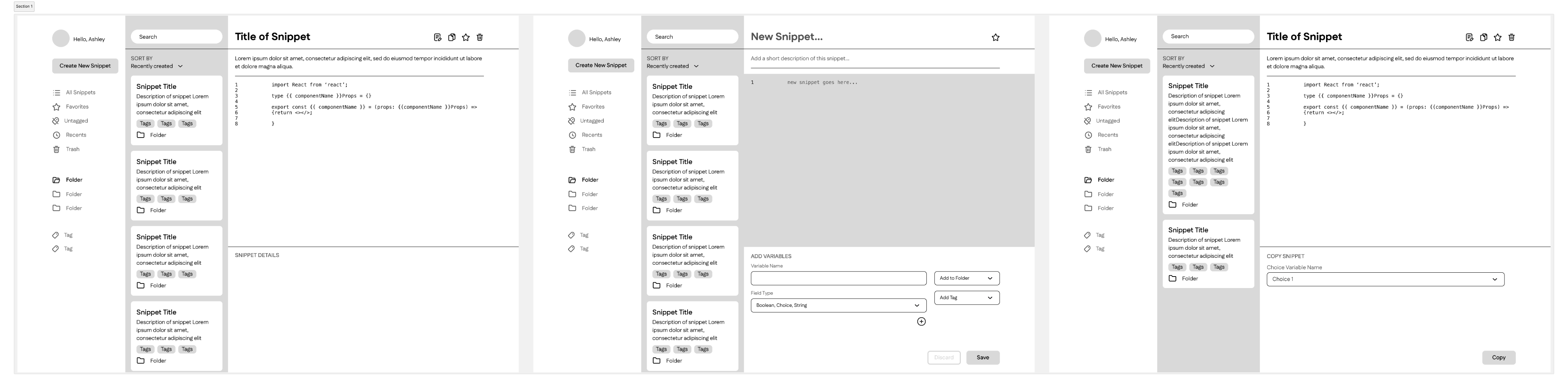
Low-fidelity wireframes were created to define layout, hierarchy, and interaction patterns before moving into high-fidelity designs. The focus at this stage was organizing information clearly, prioritizing search and snippet visibility, and ensuring common actions such as create, edit, copy, and delete were easily accessible. The structure emphasized efficiency and minimal visual distraction.
View Full Exploration
View Interactive Prototype
Visual Design
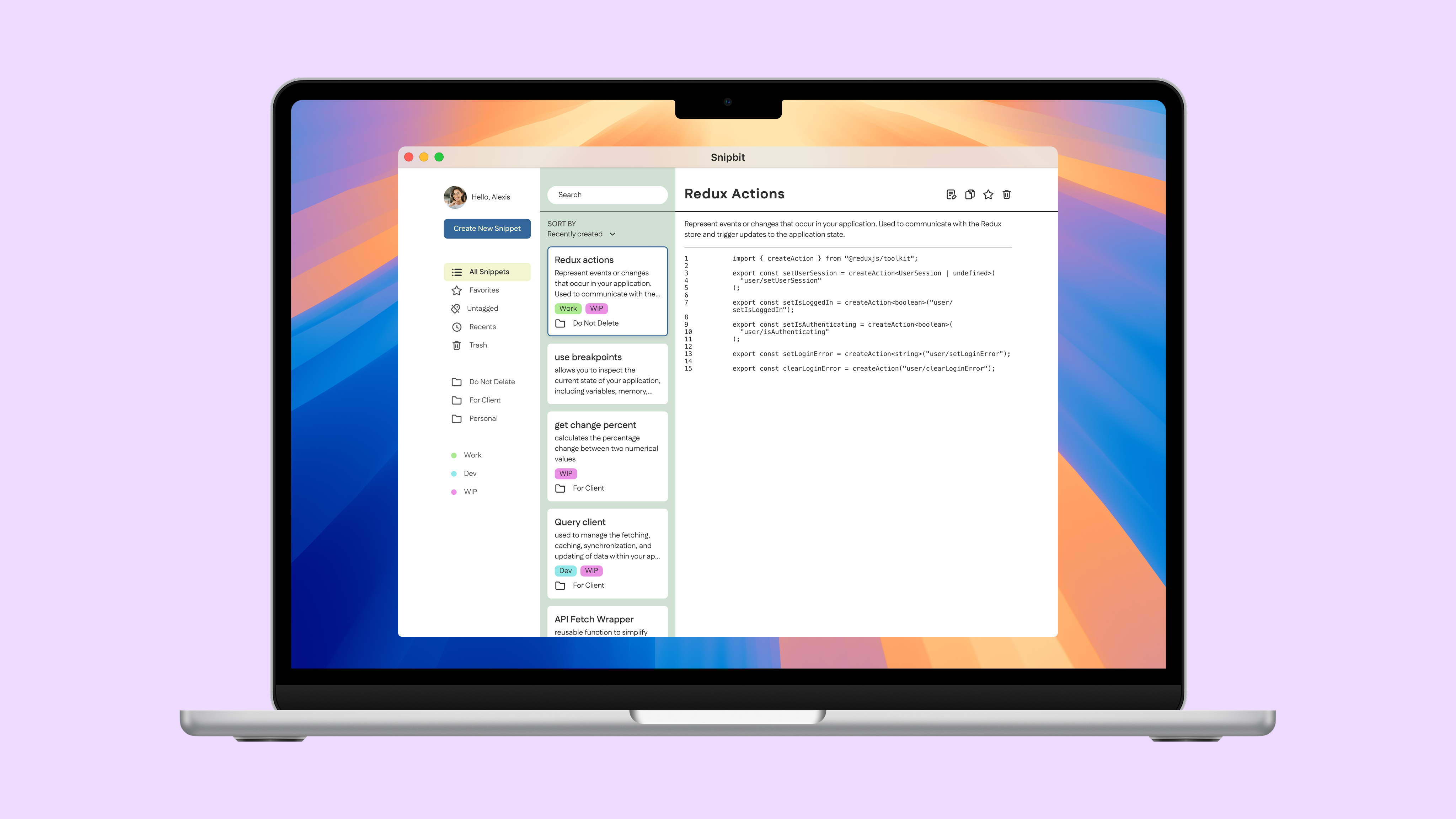
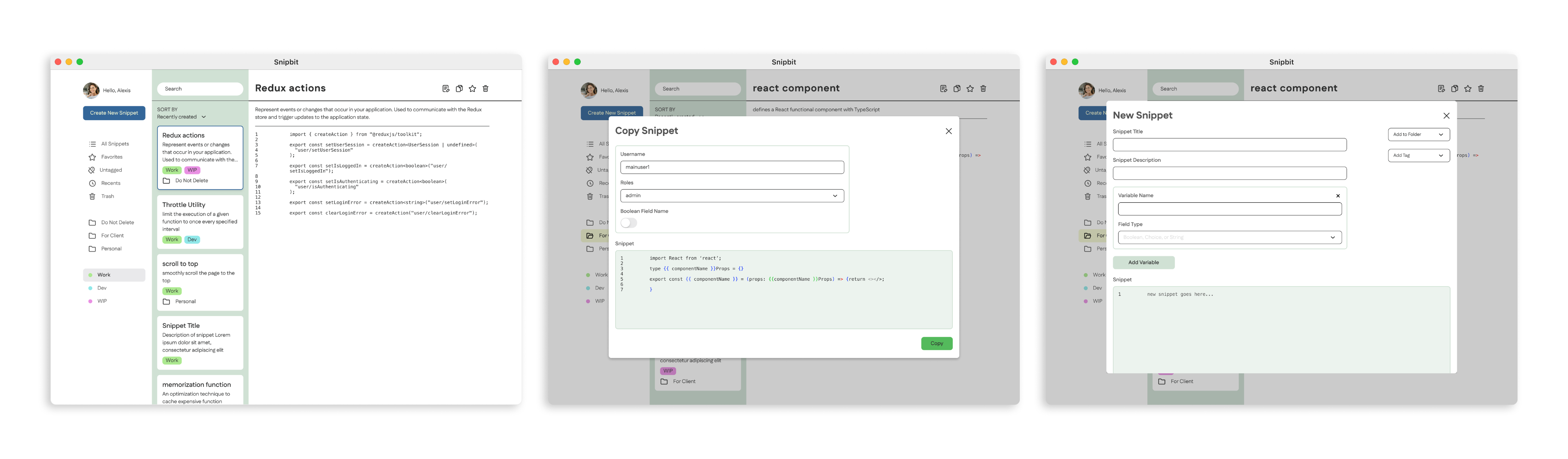
The final interface emphasizes clarity, structure, and efficiency. A minimalist layout was used to reduce visual noise and keep the focus on code content and organization. A persistent sidebar supports navigation between folders and tags, while the main workspace highlights snippet details and actions such as editing, copying, favoriting, and deleting.
Consistent spacing, typography, and simplified UI components reinforce usability and allow developers to interact with snippets quickly without unnecessary distraction.
Visual Style
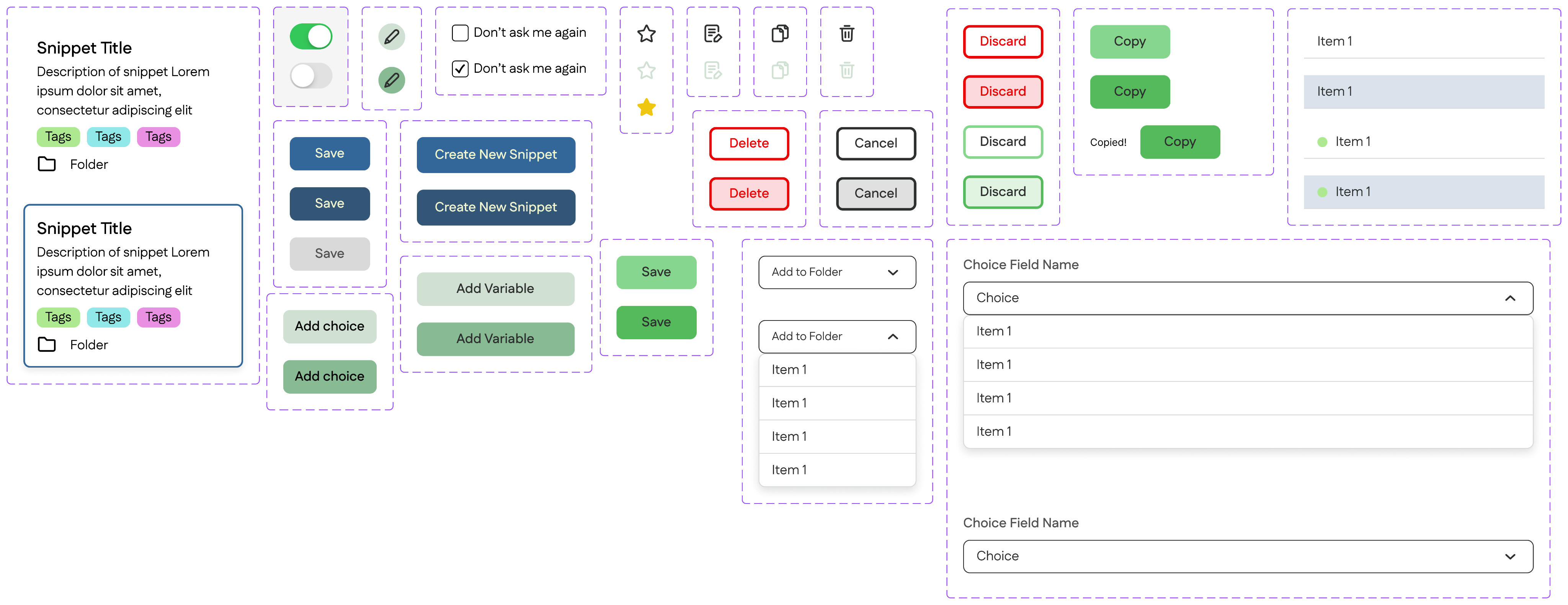
The visual style was designed to balance minimalism with functional clarity. A neutral color foundation keeps the interface focused on content, while subtle accent colors highlight actions such as saving, copying, and deleting. The UI kit emphasizes consistency across components, including buttons, input fields, drop downs, and snippet cards, ensuring predictable interactions throughout the application.
Spacing and hierarchy were intentionally structured to support readability and quick scanning. The overall aesthetic remains clean and distraction-free, allowing developers to focus on managing and interacting with their code efficiently.
Reflections & Learnings
Minimalism & Functionality
This project reinforced the importance of balancing visual appeal with functional simplicity. Designing for developers required a lot of restraint. I had to ensure the interface remained visually engaging without compromising efficiency or clarity.
It also highlighted how small UI decisions, such as action hierarchy and component consistency, significantly impact usability in productivity tools. Maintaining minimalism while supporting expanding functionality required careful prioritization and layout discipline.
Next Steps
Feature Expansion and Refinement
Future iterations would explore a dark mode option to better align with developer preferences and extended usage patterns. Additional functionality, such as enhanced filtering, snippet versioning, or integration with development environments, could further strengthen the tool’s practicality and scalability.
click here to know more about me
Resume